Stick and Throttle
This section covers basic controls of the stick and throttle, for more in depth controls visit the respective system's section.
Stick
The flight stick is mechanically connected to the aircraft's hydraulic systems for the aileron and horizontal stabilizer hydraulic actuators.
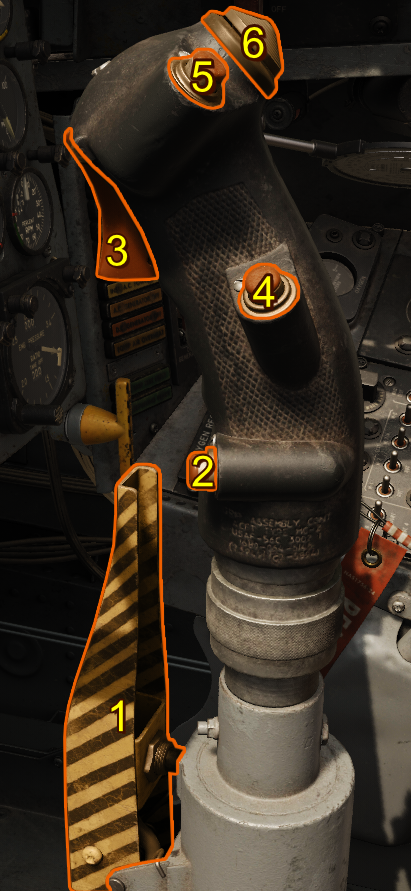
- Damper Emergency Disconnect Switch Lever
- Nose Wheel Steering Button
- Trigger
- Radar Reject Button
- Pickle Button
- Trim Hat
Note
Hide the flight stick by clicking the base.
Trim Hat
Actuates the lateral and longitudinal trim servos.
Nose Wheel Steering
The nose wheel steering button is located near your pinky finger on the flight stick. Pressing the button engages the nose wheel steering drops the mechanical link into the nose wheel assembly. Pressing it again disengages the system.
Caution
If the nose wheel is not currently aligned with the mechanical linkage, move the linkage to the current nose wheel rotation by applying the rudder pedals in the desired direction until the system connects.
Trigger and Bomb Button
The trigger and bomb buttons are used to release weapons. Specifically, the triggers used for air-to-air missiles and guns and the bomb button is used to release air-to-ground ordnance.
Note
The trigger two stages. The first stage activates the Gun Camera. The second stage fires armed guns.
Throttle
Mechanically controls fuel flow to the engine. The engine fuel control system then delivers and regulates fuel.
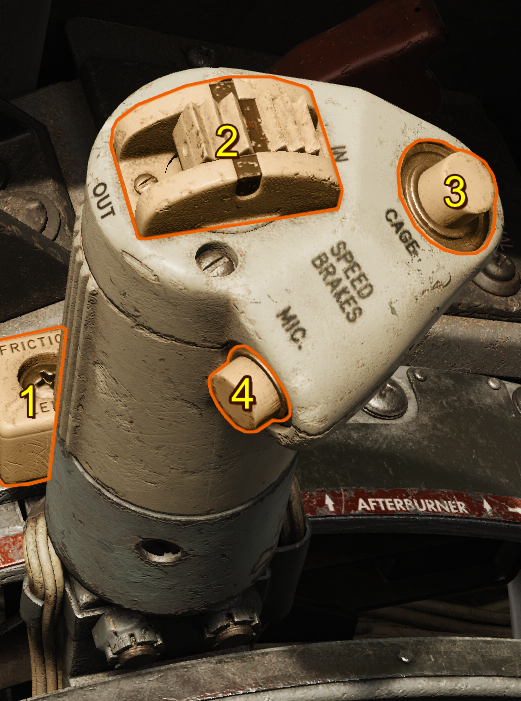
- Throttle Friction Lever
- Speed Brake Switch
- Sight Electrical Caging Button and LABS Vertical Gyro Caging Button
- Microphone Button
Throttle Friction Lever
Adjusts how much friction the throttle has. Moving the lever forward increases the friction on the throttle.
Speed Brake Switch
Actuates the speed brake. It has 3 positions:
| Selection | Description |
|---|---|
| OUT | Deploys the speed brake. |
| OFF | Stops all movement of the speed brake. |
| IN | Retracts the speed brake. |
Sight Electrical Caging Button and LABS Vertical Gyro Caging Button
Press to stabilize the sight gyro reticle on the A-4 Gunsight image by caging the sight gyros. This button also serves as the LABS vertical gyro caging button.
Microphone Button
The microphone button is a push-to-talk actuation that broadcasts input from the headset microphone using the aircraft's radio transmitter.