Seek Silence System
Introduction
The seek silence system permits either normal operation of the AN/ARC-34 command radio or decoding and coding of voice communications through the command radio. The decoding and coding capability prevents interception of messages when required. The system is powered by the primary bus.
Controls
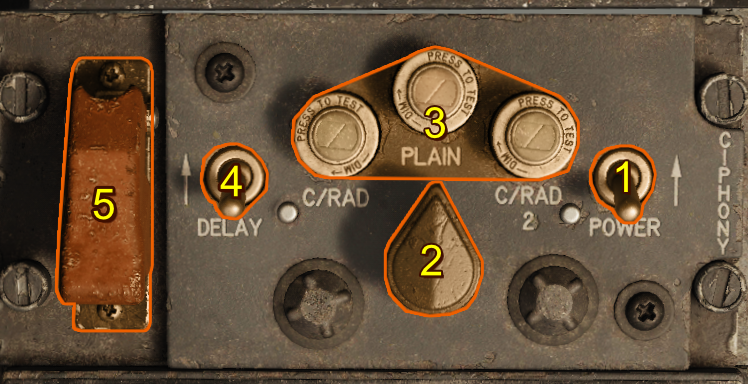
Power Switch
When the power switch is moved from OFF to ON, power is applied to the seek silence system. The command radio can be operated in the normal manner with the power switch at OFF.
Function Switch
The function switch controls decoding and coding of command radio voice reception and transmission.
| Selection | Description |
|---|---|
| PLAIN | Normal operation of the command radio is available, and only uncoded reception and transmission possible. |
| C/RAD 1 | The system decodes incoming voice communications, and codes outgoing voice communications through the command radio. |
| C/RAD 2 (INOP) | Inoperable in this simulated F-100D. A mechanical stop prevents the switch from being moved to this position. |
Function Indicator Lights
Three dimmable, press-to-test type lights indicate the position selected by the function switch. With power applied to the system, the left (green) light comes on when the C/RAD 1 position of the function switch is selected; the middle (amber) light comes on when the PLAIN position of the function switch is selected.
The right (green) light is inoperative on these aircraft.
Retransmit Switch
This switch has no function in these aircraft. The switch should always be aft (OFF), regardless of the position of the function switch.
Zeroize Switch
The zeroize switch is guarded in the normal, aft OFF position. If it becomes necessary to eject, the guard should be raised and the switch held momentarily at the forward ON position. This zeros out the ground set codes in the seek silence system.
Normal Operation
- Turn the command radio ON. (Refer to Normal Operation of Command Radio.)
- Move the power switch to ON.
- Turn the function switch to PLAIN and establish communications through normal transmission procedures where possible.
- Turn the function switch to C/RAD 1 and listen for a steady unbroken tone in the headphones for approximately 2 seconds, followed by a double-pitched broken tone. If a prolonged steady tone is audible, it indicates an improper code setting or equipment malfunction, and the function switch should be turned to PLAIN and the power switch should be turned to OFF.
- Press and hold the mic button for several seconds, then release. The double-pitched broken tone should stop and no further sound is heard in the headphones. If the broken tone continues, press mic button again and hold for several seconds. If the broken tone continues after three such attempts to clear it, move the function switch to PLAIN and power switch to OFF.
- Press and hold the mic button. Wait ½–2 seconds for a single beep tone in the headphones. If beep tone is not heard, press mic button again and wait ½–2 seconds. If beep tone still is not heard, move power switch to OFF and then to ON, and repeat steps 5 and 6. If this fails to produce the beep tone, turn function switch to PLAIN and power switch to OFF.
- When beep tone is audible, begin transmission.