Weapon Selection Circuitry
The weapon release circuitry handles weapon releases from the aircraft both armed and jettison.
The F-100D had a novel method of selecting weapons for the time: the pilot selects a release mode and weapon type. Selecting release modes and weapons using the armament selector panel.
Armament Selector Panel
This panel is responsible for:
- Selecting weapons
- Sight and bombing modes
- Fuzing options
- Pylon selection
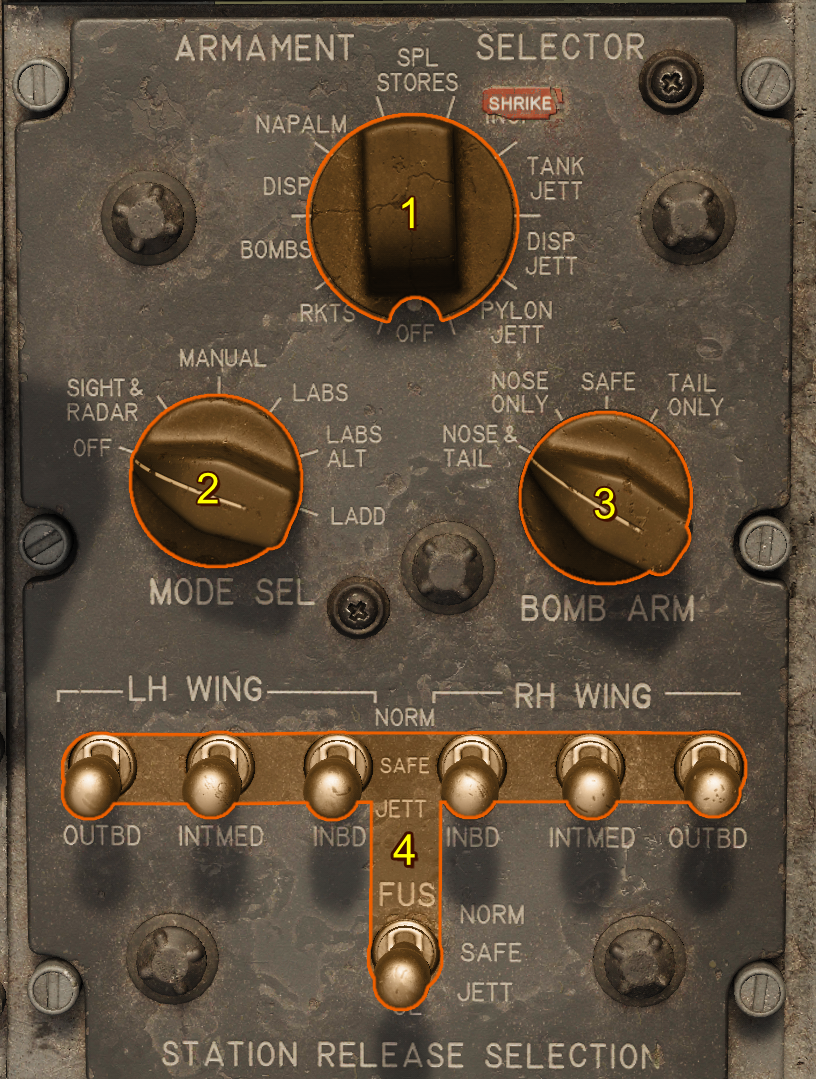
Stores Selector
The Stores Selector sets the desired weapon type. When a store type is selected, armed pylons are selected for release by the Pylon Loading Control Panel settings.
Mode Selector
This determines the release type for air-to-ground weapons. When set to any position other than the OFF position, the sight and radar are powered.
| Position | Description |
|---|---|
| OFF | Weapons, sight and radar are unpowered. |
| SIGHT & RADAR | Sight and radar are powered, and can be used with guns or missiles. The bomb button is energized for release using the gunsight bomb release mode. |
| MANUAL | Sight and radar are powered. The bomb button is energized and can send release pulses to the Basic Armament Control Circuitry or Aircraft Weapons Release System. This mode sends pulses directly to release weapons. |
| LABS | Sight and radar are powered. The bomb button is energized, and can send activation signals to the LABS for the normal LABS mode (LOFT). |
| LABS ALT | Sight and radar are powered. The bomb button is energized and can send activation signals to the LABS for the alternate LABS mode (Over-the-Shoulder). |
| LADD | Sight and radar are powered. The bomb button is energized and can send activation signals to the LABS for the low altitude drogue delivery LABS mode. |
Bomb Arm Switch
This controls the bomb-arming solenoids in the pylons. This only affects bomb and napalm arming.
| Setting | Fuzes | High Drag Tail Kit Deployed (if bomb has one) |
|---|---|---|
| SAFE | NONE | NO |
| NOSE | NOSE, CENTER | NO |
| TAIL | TAIL, CENTER | YES |
| NOSE & TAIL | NOSE, CENTER, TAIL | YES |
Station Release Selection Switches
These 7 switches break the circuit between the aircraft systems and the pylon firing and jettisoning circuitry. When a pylon is in the NORM position, release circuitry is active. When a pylon is in the JETT position, the jettison circuitry is active instead.
Caution
When arming the weapons system, keep switches in the NORM position, as the stores selector will select the correct weapons for drop.
Warning
Turning these switches off do not remove them from the Aircraft Weapons Release System Circuit firing order. Thus disabling some of these while using the AWRS can result in a hung weapon release sequence.
Pylon Loading Control Panel
This panel stores information about the type of weapon mounted on each pylon. Set each 7-position switch so that the Armament Selector Panel can correctl selects pylons by their weapon type.
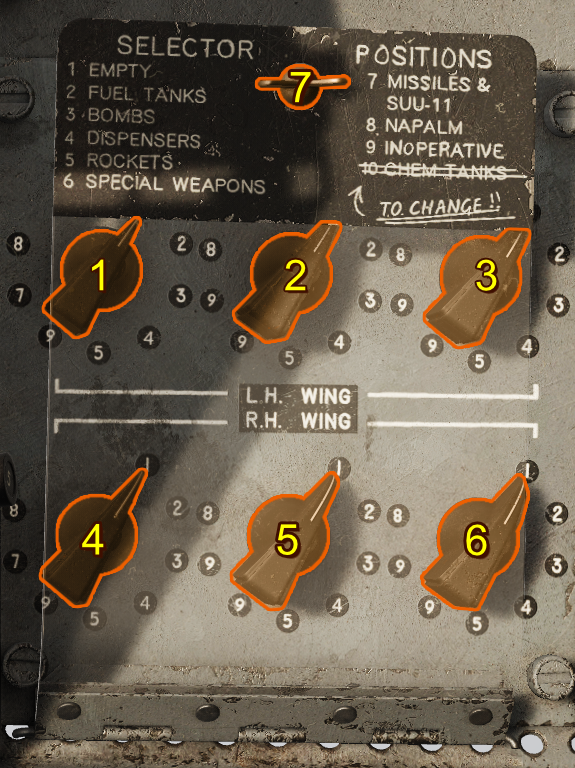
- Left Inboard Weapon Setting
- Left Intermediate Weapon Setting
- Left Outboard Weapon Setting
- Right Inboard Weapon Setting
- Right Intermediate Weapon Setting
- Right Outboard Weapon Setting
- Pylon Loading Control Panel Latch and Cover
By default, each pylon's dial is set by ground crew upon re-arm or spawn. You can choose to perform this step yourself in the special options).
There are 1-9 possible weapon mountings. These mostly match the weapon types found on the Stores Selector.
| Number | Ordinance | Notes |
|---|---|---|
| 1 | Empty | Nothing Loaded |
| 2 | Fuel Tanks | Important for G-Limit and Jettison |
| 3 | Bombs | |
| 4 | Dispensers | |
| 5 | Rockets | |
| 6 | Special Weapons | Nuclear Ordinance |
| 7 | Missiles | This is functionally the same as empty as the missiles are not control by the armament control panels |
| 8 | Napalm | |
| 9 | Inoperative | Functionally the same as Empty. With the exception of the inner pylons where this indicates the presence of shrikes. |
Status Display Lights
The status display lights indicate various information about the current state of the weapon system.
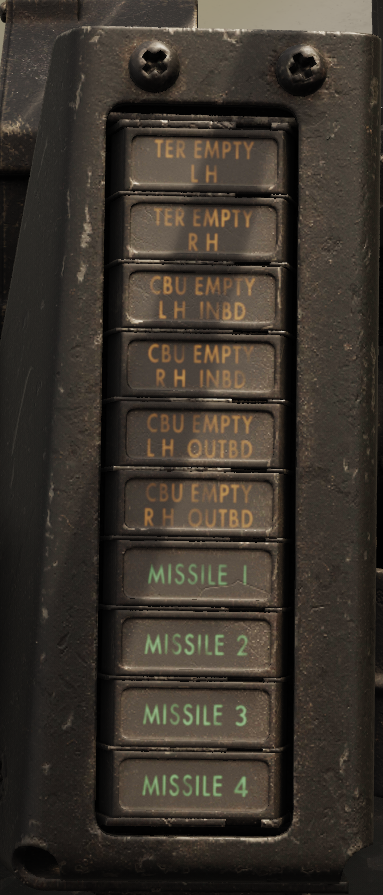
| Light | Purpose |
|---|---|
| TER EMPTY | If a TER is mounted on an inner pylon, indicates it is empty of bombs |
| CBU EMPTY | If a CBU Dispenser is mounted, indicates if it is fully depleted |
| Missile | Indicates if a AIM-9 Sidewinder misile is ready to be fired. Missiles are listed in firing order. |